How I stopped spending my nights zooming into thumbnails one at a time, and what the plugin actually does inside Lightroom Classic.
A typical morning for a photographer at a film festival: I import the card and Lightroom fills the grid with four hundred and twenty frames of the same face. And I have to dig the best ten or twelve frames out of that pile.
The photocall that produced them lasted eight minutes. The subject walks in, in front of a row of long lenses and flashes firing at once. He turns right, comes back to the centre, then left, two seconds at a time, while his name is shouted at him from five different points. Of those four hundred and twenty frames, the ones that count for me are only those where his eyes land in my lens and not in the lens of the photographer next to me.
This is not choosing, it is sorting
People outside this job think you spot the good ones straight away. In the grid those frames look like the same photograph printed four hundred times. What separates a keeper from a discard is a few degrees of head rotation, invisible in a thumbnail an inch wide. Focus is worse: until you zoom to 100 per cent, one file at a time, you cannot tell whether the eyes are sharp or the nose is.
So the routine never changed. Scroll, zoom, decide, drop a colour on it, go back and start again. Twenty to twenty-five minutes every time, sometimes in the middle of the night, after twelve hours on my feet. None of it was editing. It was manual labour on material mostly headed for the bin.
[[IMAGE 1: the Lightroom Classic Library grid full of near-identical frames of the same face, before any analysis]]
Culling programs answer a different question
Automatic culling tools and features exist, and some of them work well: they measure sharpness, spot closed eyes, group the near-identical frames of a burst, pick the ones with the eyes in focus, and so on. None of them checks the one thing a photocall turns on: which lens the subject is looking into. A frame can be sharp, well exposed, the eyes open, and still fall short: in that instant the actor was looking into somebody else's camera.
What happens inside Lightroom
So I wrote it for myself. It is called Hit the Lens Plugin, and on Lightroom Classic it is a proper plugin, not a separate application that has you jumping between two windows.
To install it Lightroom has to be closed, since it loads plugins at startup. Run the installer, open Lightroom again, and the entry is in the Library module, under Library > Plug-in Extras > Hit the Lens Plugin: analyze the selected photos. The plugin follows Lightroom's own language, so on an Italian Lightroom that entry reads "Hit the Lens Plugin: analizza le foto selezionate".
Select the photos you want checked and open that entry. It analyses those and only those; the rest of the catalog is never touched. What does it do? It settles two questions: is the head turned towards your lens, and is the picture sharp. Then it writes a single colour label straight into the catalog.
- Green: eyes in the lens and the picture sharp. Your candidates.
- Yellow: borderline. Either the gaze does not quite convince it, or the sharpness looks marginal. Worth opening.
- Purple: there is a face in the frame, and the eyes on it are not sharp.
- No label: the gaze is elsewhere, no face was found, or the file would not analyse. Nothing is written.
The labels live in the catalog, and that is all. It creates no XMP files, it leaves nothing next to your photos, and the RAW files stay as they were. If your selection contains pictures you labelled by hand, it stops and asks first: clear the existing colours and carry on, or touch nothing. A label you set yourself is never wiped behind your back. And it works on colour labels only. Stars stay your own measure.
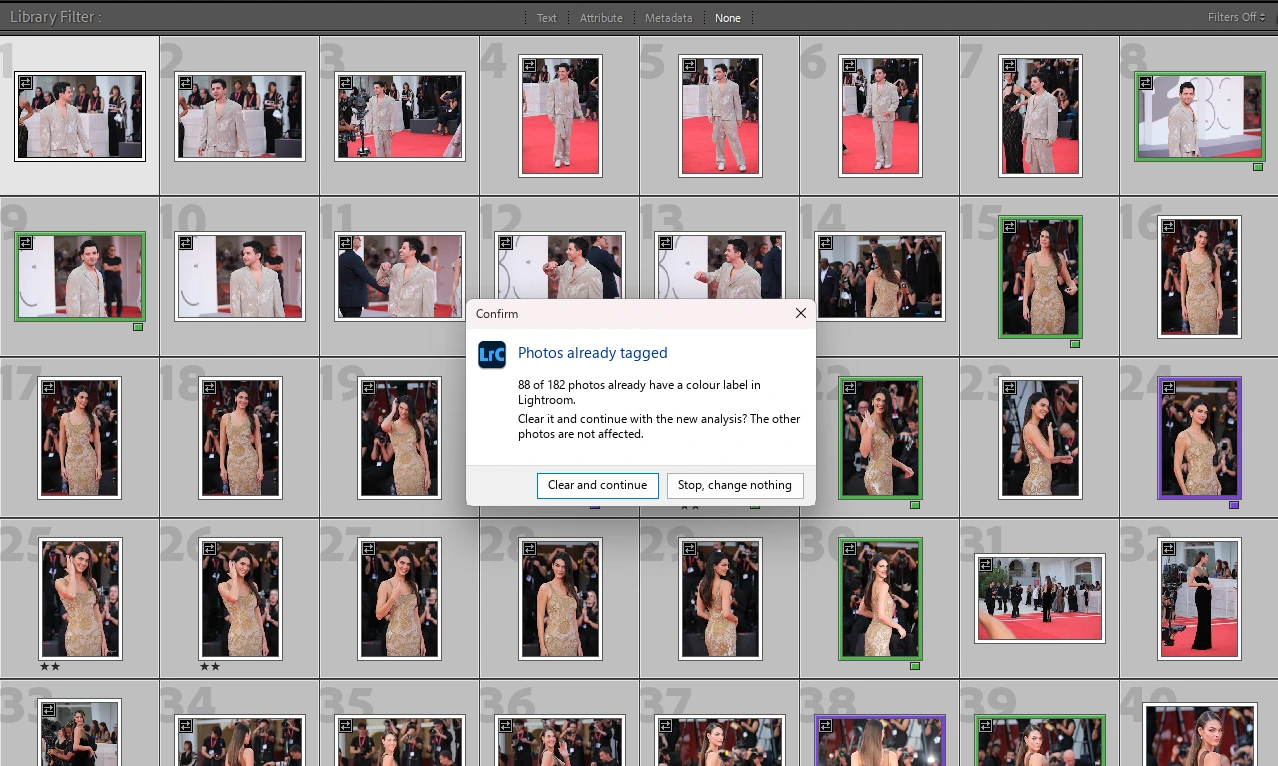
If the selection already contains labelled photos, the plugin stops and asks.
All the work happens on your own machine. No photo is uploaded anywhere, and during the free beta the program makes no network calls at all, update checks included.
At the end it tells you how many photos were left out and why: files that are not RAW (it skips JPEGs), virtual copies, files the catalog can no longer find, duplicate names.
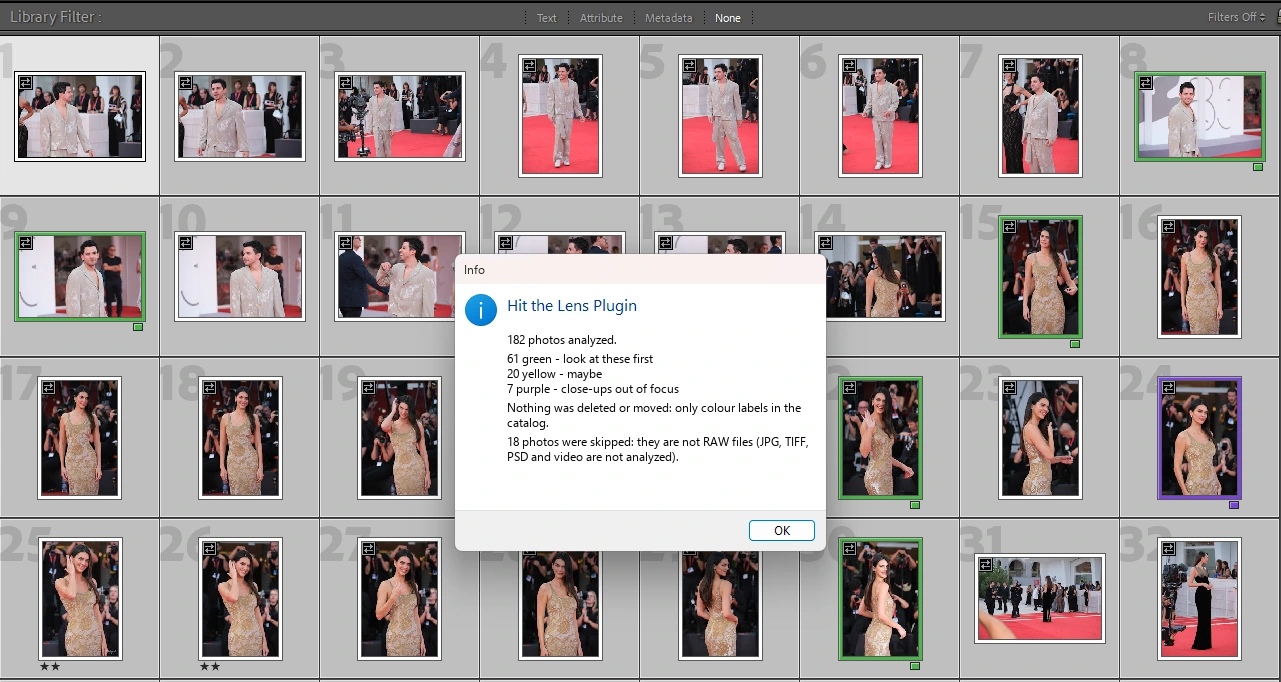
The summary at the end: how many green, yellow and purple, and what was left out.

The plugin entry in the Lightroom Classic menu.
Then back to the Library filter bar, tick green, start there. On my usual photocall I went from twenty or twenty-five minutes down to ten or fifteen. On my computer, in Lightroom Classic 15.5.1, three hundred and eight RAW files go through in about a minute. That is my machine; yours will differ.
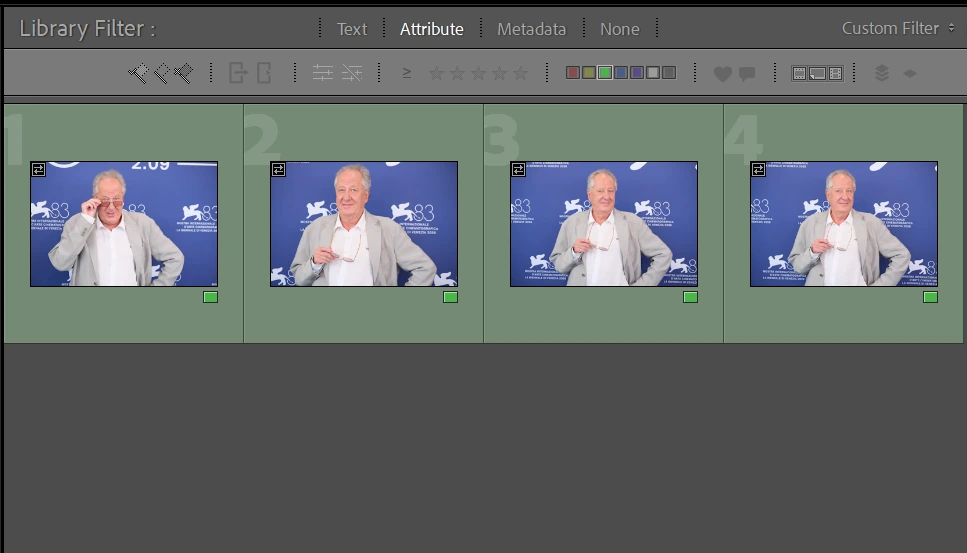
In the filter bar you tick green and start there.
Sunglasses do not stop it, as long as the face is turned towards the camera: the judgement starts from how the head is oriented, not from the pupils. On a red carpet in July that counts.
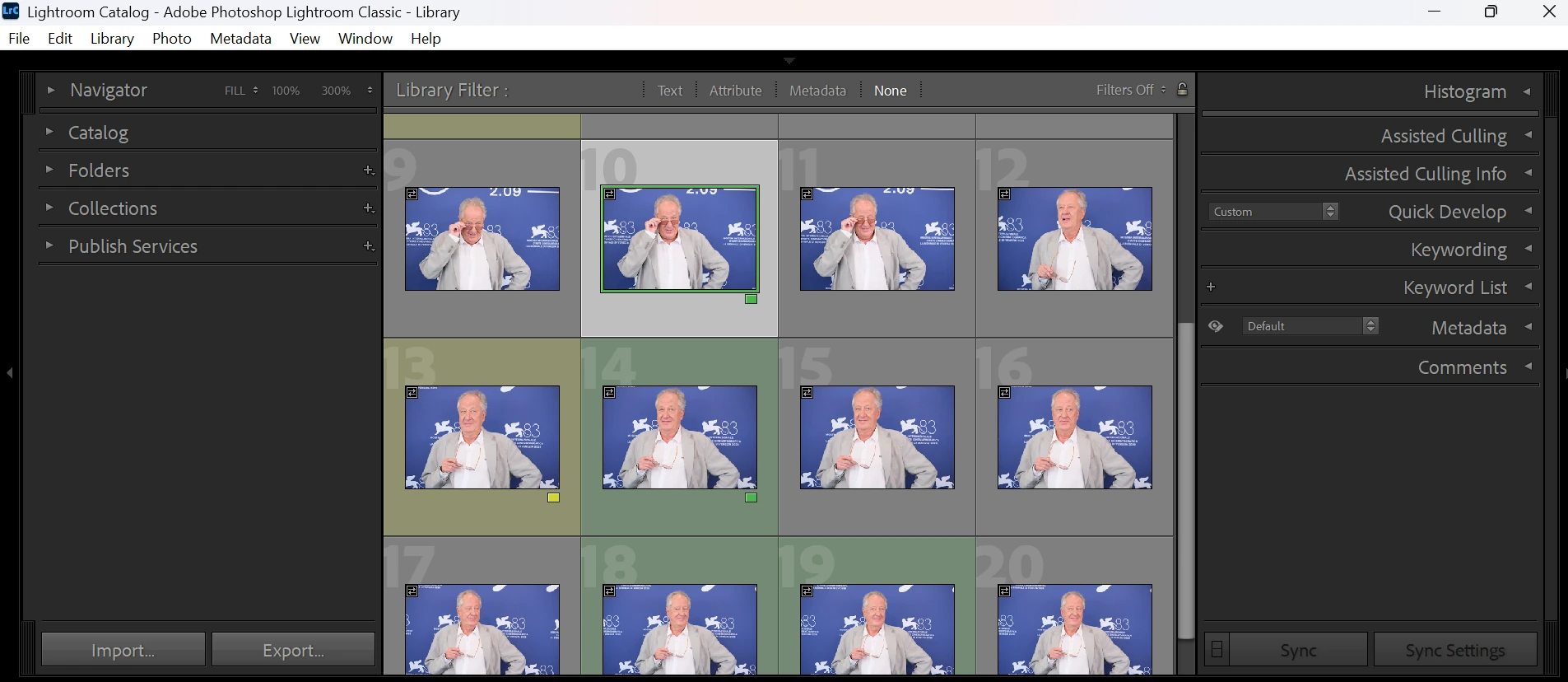
The same burst once the analysis is done: green, yellow and purple across the thumbnails.
Where it stops
It runs on Windows 10 and 11, 64-bit. No Mac version today. It is a beta, 0.9.7, dated 22 September 2026: it can get things wrong, and it can have bugs, so your usual review pass still applies. The beta terms spell that out. The installer is not signed yet, so Windows SmartScreen may put up the blue "Windows protected your PC" screen the first time: open "More info", then "Run anyway".
What it hands back is a pre-selection to check, not a verdict. It deletes nothing and moves nothing; it just puts the pile in order. Looking at the photographs is still your job, the unlabelled ones included.
How to try it
It is free until 31 January 2027. No account, no key, nobody asks for a card. The product page carries a short form: an email address and what kind of photography you do, plus two boxes you have to tick, the terms and the beta as it stands. The link then arrives by email. Worth knowing before you install: once that date has passed, the copy on your machine stops analysing photos. Nothing is deleted, and the labels already written stay put.
After the beta the price will be 39 euros, with an introductory price of 29 euros, at launch. Anyone who tried the beta and ticked the optional box about promotional emails gets an email before the free period ends, with a code that brings the price down to 19 euros. Leave the box empty and the only emails you get are the service messages about the download.
What I need from you
Nothing to buy here. If you work these events, put it on a real job of yours, not a test folder, and then send me the frames it gets wrong: the false greens, the good shots it let slip, and the genres I never photograph: weddings, sport. When it gets things right I learn nothing. The mistakes show me where it still does not understand the job. Write to hitthelensplugin@fadege.it. I read and answer them myself.
[[IMAGE 4: two consecutive frames in Lightroom's compare view, on the left the eyes in the lens, on the right the head turned by a few degrees]]
If Lightroom is not where you work, this plugin is no use to you. For Capture One there is no plugin: there is a separate Windows application, launched from Capture One's Image > Open With menu, which writes the colours into XMP files next to the photos. I told that story in a separate article.
Hit the Lens Plugin is an independent product of DIGITAL INDEX (Modena, Italy), VAT IT02271330363. It is not affiliated with, sponsored, authorised or endorsed by Capture One A/S or Adobe. Capture One is a registered trademark of Capture One A/S. Adobe and Lightroom are either registered trademarks or trademarks of Adobe Inc. in the United States and/or other countries.