Instantly filter all photos where the subject is looking directly at the camera with tack-sharp focus on the eyes.
Hit the Lens Plugin for Adobe® Lightroom® Classic and Capture One® — free beta until January 31, 2027, available in English, Italian, French, Spanish, and German.
Hit the Lens Plugin was born out of my work as a photographer. Covering photocalls and red carpets at numerous film festivals and beyond often means starting post-production with hundreds of near-identical shots of the same face, and the slowest part of the selection was never the retouching: it was scrolling through them all to find the (in-focus) shots where the subject is actually looking into the camera.
I built this plugin to take that repetitive step off my hands and get back to the real editing sooner.
Where post-producing a photocall used to take me 20–25 minutes, it now takes me 10–15.
How? The plugin assigns color filters for the types of photos to be filtered.
How color tags work
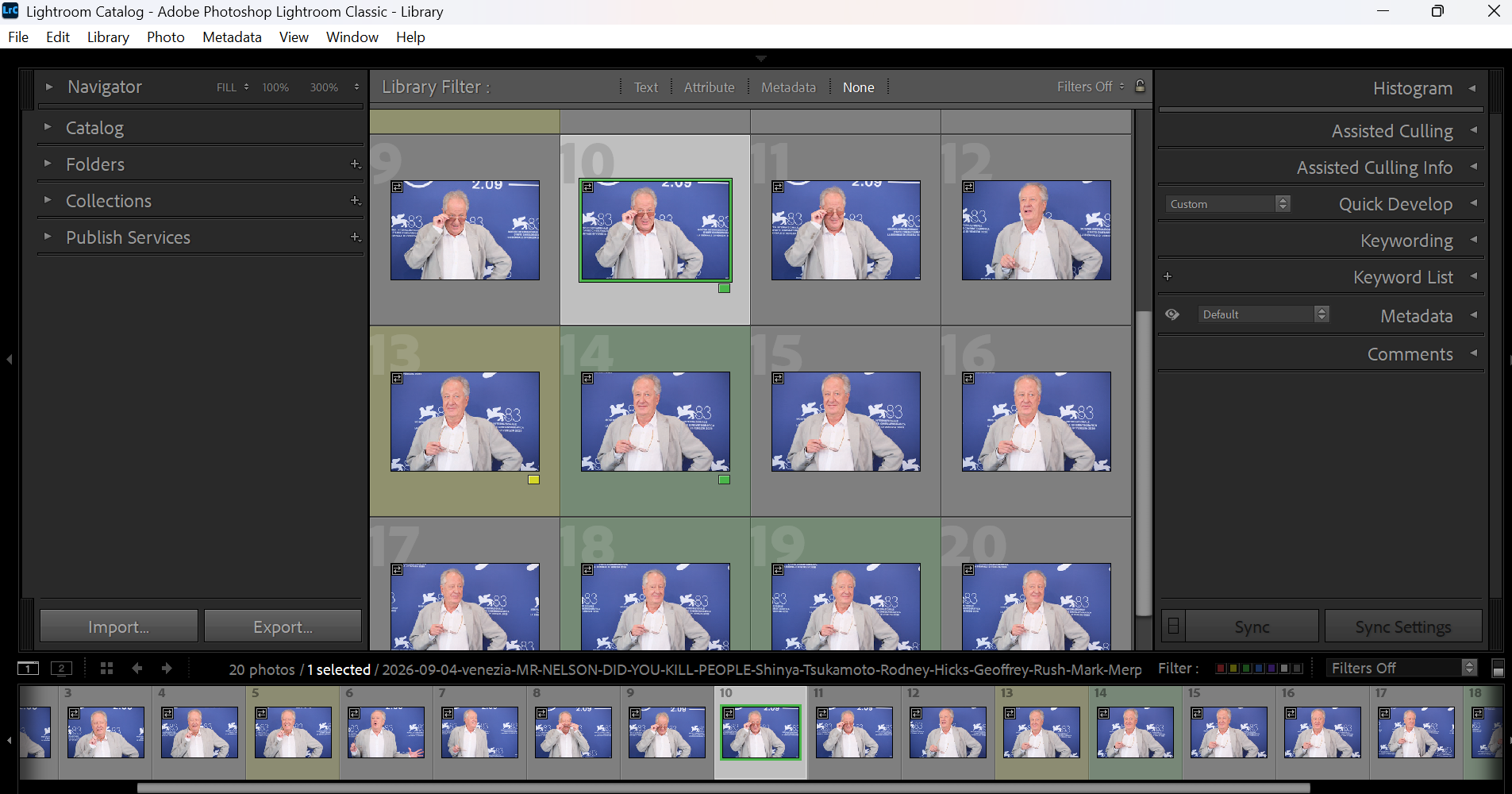
Hit the Lens Plugin analyzes each photo and writes one color tag, based on what it finds:
Green — the subject is looking into the lens and the shot is sharp. This is the tag you're looking for.
Yellow — borderline: either the plugin isn't fully sure the subject is looking into the lens, or the shot looks slightly soft. Worth a second look.
Purple — the subject in the foreground is out of focus
No tag — the subject isn't looking into the lens, no face was found, or the photo couldn't be analyzed. Nothing is written.
The plugin never overwrites a color tag you've already set by hand, and it never touches your RAW files, only the tag itself changes.
FOR ADOBE LIGHTROOM CLASSIC FOR CAPTURE ONE
Version for Adobe® Lightroom® Classic
Installing it
- Close Lightroom Classic if it is open: it loads the plugin only when it starts.
- Download the installer and run it. The beta installer is not yet digitally signed, so Windows SmartScreen may show a blue screen titled “Windows protected your PC”:
- click “More info”,
- then “Run anyway”.
- Follow the setup wizard; it installs for your Windows user only, no administrator rights needed. The plugin is added to Lightroom automatically: there is nothing to add by hand in the Plug-in Manager.
- Open Lightroom Classic: the plugin appears under Library > Plug-in Extras.
To remove it, uninstall “Hit the Lens Plugin for Lightroom Classic” from Windows Settings > Apps: the plugin is removed from Lightroom as well. The color labels already written stay in your catalog.
How to use it
After installing, open Lightroom Classic, go to the Library module, select the photos you want to check and choose Library > Plug-in Extras > Hit the Lens Plugin.
Exactly the selected photos are analyzed: for a whole folder select them all (Edit > Select All, or Ctrl+A in the Grid view); for a single shot, just select that one.
The color labels (green, yellow, purple) are written directly into the Lightroom catalog: no XMP files are created and your RAW files are never modified.
When it finishes, a short summary shows how many photos got each color; use the Library filter bar (Attribute > Color Label) to see the green ones first.
If some photos in the folder already have a color label, the plugin asks first: clear those labels and continue, or stop without changing anything.
It gives you a pre-selection to check, not a final verdict — you review and correct the labels in Lightroom as usual.
Requirements
- Windows 10 or 11, 64-bit.
- Adobe Lightroom Classic (tested on version 15.5.1).
- The plugin follows Lightroom's language: English, Italian, French, Spanish or German.
Download
Download Hit the Lens Plugin for Adobe Lightroom Classic (free beta)
Version 0.9.9-beta, 26 September 2026 — Windows installer, 64.1 MB.
Installer SHA-256: 216d85986ac817f4d1f42a2cad8c33d70404f838ce5ff5322e30ce005134a87d
Version for Capture One®
How to use it
Hit the Lens Plugin is a separate Windows application, launched from Capture One's Image > Open With menu.
It looks at the photos in your session and writes standard XMP sidecar files, which Capture One® reads back with Image > Load Metadata.
It is not built with the Capture One® SDK, does not install anything inside Capture One, and does not appear in Capture One's Plugin manager.
Capture One® 16.8 introduced Assisted Review, which automatically flags closed or out-of-focus eyes and exposure problems (Capture One's own help article, “Assisted Review (Beta)”; it only flags images, it does not remove or hide any, and it does not look at where anyone is looking).
Hit the Lens Plugin picks up from there: it looks at the whole session and finds the shots where your subject is actually looking into the lens.
It gives you a pre-selection to check, not a final verdict - colour tags you review and correct in Capture One® as normal.
It is most useful on photocalls: red carpets, press lines, panels - anywhere you come home with hundreds of near-identical frames of the same face and need to find the ones looking at the camera fast.

Requirements
- Windows 10 or 11, 64-bit.
- Capture One, sessions only in this beta (catalogs are not supported yet).
Installing it: about the Windows security warning
The beta installer is not yet digitally signed, so Windows may show a warning the first time you run it. This is expected and normal for a new, small, independently published app - here is what to do:
- Close Capture One® (and any open Hit the Lens Plugin window) before installing.
- Download the installer and run it. Windows SmartScreen may show a blue screen titled “Windows protected your PC”.
- Click “More info”.
- Click “Run anyway”.
- Follow the setup wizard; it installs for your Windows user only, no administrator rights needed.
Download
Download Hit the Lens Plugin for Capture One (free beta)
Trouble with the button above? Direct download from the fallback form on this site.
Version 0.9.9-beta, 26 September 2026 — Windows installer, 64.2 MB.
Installer SHA-256: 0c265891efbfee42ba564d285fad6355f893bbc0ebdd3eb9217153d38a5557af
-------------------------------- o --------------------------------
Free during the beta
Hit the Lens Plugin is free to use until 31 January 2027. No licence key, no account, no card required to try it.
What comes next for all versions
Hit the Lens Plugin stays free through the beta. After that, it becomes a paid licence at EUR 39, with a EUR 29 launch price. Anyone who tried the beta and opted in to promotional emails gets a EUR 19 discount code by email before the free period ends. Without that tick box no promotional email is sent: only the service messages about the download.
Legal
- Privacy notice
- Free beta terms
- Information and requests: hitthelensplugin@fadege.it
Hit the Lens Plugin is an independent product of DIGITAL INDEX (Modena, Italy). It is not affiliated with, sponsored, authorised or endorsed by Capture One® A/S or Adobe. Capture One® is a registered trademark of Capture One® A/S in the European Union and/or other countries. Adobe® and Lightroom® are either registered trademarks or trademarks of Adobe® in the United States and/or other countries. All other trademarks are the property of their respective owners and are used only to identify the software with which this product is designed to work.